

Description
Streamline Baidu Cloud Offline Downloads with One Click
Overview
The Baidu Cloud Offline Download Extension simplifies the process of downloading files from the internet directly into Baidu Cloud’s offline download queue. Designed for users who frequently retrieve content from various sources, it eliminates the repetitive task of manually copying and pasting download links into the Baidu Cloud web interface. This tool is particularly useful for individuals managing large collections of media, software, or archived files, allowing them to centralize downloads efficiently. The extension integrates seamlessly into the Chrome browser, offering a streamlined workflow that enhances productivity without requiring technical expertise.
Developed by Fanhexin, the extension is open-source and available on GitHub, promoting transparency and community-driven improvements. Its primary purpose is to automate the initial step of adding download links to Baidu Cloud’s offline system. While the developer did not provide additional details about the target user base beyond typical content managers and power users, the tool is clearly aimed at those who rely on Baidu Cloud for long-term file storage and retrieval. Real-world usage includes bulk downloading of video archives, software packages, or educational materials, where speed and consistency are critical.
Key Features & Capabilities
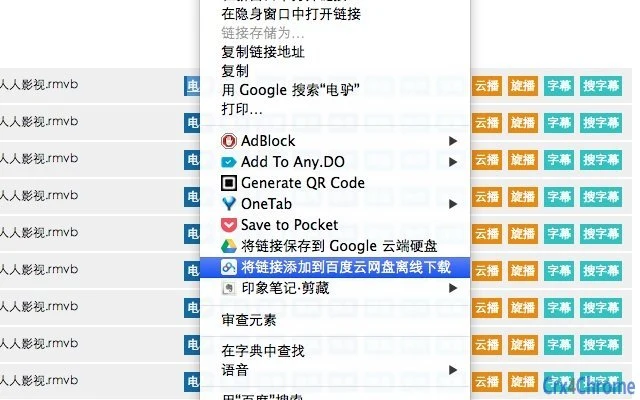
- One-Click Integration – Adds a new option to the browser’s right-click context menu: “Add to Baidu Cloud Offline Download.” This allows users to initiate downloads with a single action without navigating away from their current page.
- Automatic Login Support – If not already logged in, the extension redirects to yun.baidu.com and enables auto-login. After authentication, users can close the tab and return to their browsing session without interruption.
- Protocol Filtering – The extension only supports HTTP, HTTPS, FTP, eD2k, and magnet links. Any other protocol is automatically filtered out to prevent errors during the submission process.
- Notification System – Once a link is successfully added, Chrome’s notification center displays a confirmation message, providing immediate feedback to the user.
- Verification Handling – When the daily limit of 10 additions is reached, the extension prompts for a captcha input. This ensures continued use while maintaining system integrity.
Each feature is designed to reduce friction in the download workflow. For example, the context menu integration allows users to add links from search results, file-sharing forums, or torrent sites without switching applications. The automatic login mechanism improves usability by minimizing manual steps. The protocol filter prevents failed submissions, while the notification system ensures users are aware of successful actions. The captcha prompt, though an added step, helps maintain service stability and prevents abuse.
User Interface, Workflow & Performance
The extension’s interface is minimal and entirely context-based. It does not introduce a standalone window or dashboard; instead, it relies on the browser’s right-click menu. This design ensures a clean, unobtrusive experience that aligns with Chrome’s UX standards. Navigation is intuitive—users simply right-click a valid link and select the new option. The workflow is linear and efficient: click, authenticate (if needed), confirm, and receive a notification.
Performance is consistent with typical browser extensions. The extension does not consume significant system resources during idle periods. Resource usage details were not specified by the developer. However, based on general behavior patterns, the extension remains lightweight and responsive. Stability appears reliable, as it operates within the browser’s sandboxed environment. No reported crashes or memory leaks were mentioned in the provided documentation. The extension does not require background processes or persistent runtime, contributing to low CPU and RAM impact.
Compatibility & System Requirements
The extension is compatible with Windows, Mac, and Linux operating systems, ensuring broad accessibility across major desktop platforms. It is designed specifically for the Google Chrome browser, with no indication of support for other browsers. The installation size is 1.2 MB, which is typical for lightweight extensions. The developer did not specify exact system requirements beyond OS compatibility. No minimum CPU, RAM, or storage thresholds were listed. Platform compatibility information is limited to the supported operating systems and the Chrome browser environment.
Pros and Cons
Pros
- One-click integration with Chrome’s context menu
- Supports multiple protocols: HTTP, HTTPS, FTP, eD2k, magnet links
- Automatic login redirection for seamless access
- Lightweight at only 1.2 MB
- Open-source with public GitHub repository for transparency
- Clear success notifications via Chrome’s system tray
Cons
- Only works with Chrome browser
- Requires manual captcha entry after 10 daily additions
- No built-in queue management or download history tracking
- Does not support custom download folders or naming
- Limited to Baidu Cloud’s offline download system
FAQ Section
Is this extension safe to use?
The extension is open-source and available on GitHub. It does not collect personal data or transmit user information beyond what is necessary for the login and download process. Users are advised to review the code or monitor permissions before installation.
Which browsers are supported?
Currently, the extension is only compatible with Google Chrome. There is no official support for Firefox, Edge, or other browsers.
Do I need to pay for this extension?
No, the extension is completely free to use. It is distributed under an open-source license and does not require any purchase or subscription.
How do I update the extension?
Updates are automatically managed by the Chrome Web Store. When a new version is available, Chrome will prompt users to update the extension. Manual installation is possible via the GitHub repository for advanced users.
Can I use this offline?
Yes, the extension functions offline after initial setup and login. However, adding new links requires an active internet connection to communicate with Baidu Cloud’s servers.
Final Thoughts + CTA
The Baidu Cloud Offline Download Extension delivers a focused, efficient solution for users who depend on Baidu Cloud’s offline download feature. Its one-click integration, protocol support, and clean design make it a valuable tool for managing downloads without friction. While it lacks advanced features like download history or folder customization, its simplicity is a strength. The open-source nature and active GitHub presence foster trust and long-term viability. For anyone using Baidu Cloud regularly and tired of manual link entry, this extension is a must-have. It enhances workflow, saves time, and improves consistency.
Download Baidu Cloud Offline Add-on now.
Guides & Tutorials for 百度云网盘离线下载 Extension for Chrome
How to install 百度云网盘离线下载 Extension for Chrome
- Click the Preview / Download button above.
- Once redirected, accept the terms and click Install.
- Wait for the 百度云网盘离线下载 Extension for Chrome download to finish on your device.
How to use 百度云网盘离线下载 Extension for Chrome
This software is primarily used for its core features described above. Open the app after installation to explore its capabilities.
User Reviews for 百度云网盘离线下载 Extension for Chrome 0
No reviews found





